
This article covers the AWS Certified SysOps Administrator - Associate (SOA-C02) certification exam preparation notes and key concepts.
Overview of AWS SysOps
Overview
What is Cloud Computing?
Cloud computing refers to the provision of computing resources as a service, with the cloud provider owning and managing the resources rather than the end-user.
It is:
- Browser-based software programmes
- Third-party data storage
- Third-party servers that support a business, research or personal project’s computing infrastructure.
Before the widespread adoption of cloud computing, businesses and regular computer users had to purchase and maintain the software and hardware needed.
By moving away from on-premise software and hardware, cloud customers can avoid investing the time, money and skills required to purchase and manage these computing resources.
This unparalleled access to computing resources has spawned a new wave of cloud-based enterprises, altered IT practices across industries, and revolutionized many routine computer-assisted activities.
Individuals can now collaborate with other workers via:
- Video meetings and other collaborative platforms.
- Access on-demand entertainment and instructional content.
- Speak with household appliances.
- Hail a cab with a mobile device.
- Rent a vacation room in someone’s home.
Scope of Cloud Computing
Cloud computing is defined by the National Institute of Standards and Technology (NIST). NIST is a non-regulatory agency of the United States Department of Commerce to advance innovation.
According to NIST there are five core properties of Cloud Computing:
Self-service on-demand: Consumers can get quick access to cloud services after signing up with this strategy. Organizations can also set up systems that employees, customers, or partners to use internal cloud services on demand based on established logics without to go via IT.
Broad access to the internet: Users that have permission can access cloud services and resources from any device and any networked location.
Pooling of resources: Cloud Users can choose from a pool of “hardware” what is needed.
Elasticity that responds quickly: The infrastructure can respond quickly to changed demands.
Service that is measured: You only pay for what you use.
History of Cloud Computing
1950s: Universities renting Compute Resources. Renting was one of the only methods to get access to computing resources at the time.
1960s: John McCarthy of Stanford University and J.C.R. Licklider of the US Department of Defense Advanced Research Projects Agency (ARPA) proposed the public utility and the possibility of a network of computers that would allow people to access data and programs from anywhere on the planet.
2006: Amazon’s Elastic Compute (EC2) and Simple Storage Service (S3)
2007: Heroku
2008: Google Cloud Platform (GCP)
2009: Alibaba Cloud
2010: Microsoft Azure (fka Windows Azure), IBM SmartCloud, and DigitalOcean
2011: Windows Azure renamed to Microsoft Azure
Cloud Computing’s Benefits
- Cost
- Speed
- Scalability
- Productivity
- Reliability
- Security
Types of Cloud Computing
Public Cloud: Owned and maintained by a third-party cloud service provider.
Private Cloud: Exclusively used within a single business or an organization.
Hybrid Cloud: Linked by technology to allow data applications to be exchanged across them.
Overview of Cloud Services
IaaS: Infrastructure as a Service
PaaS: Platform as a Service
SaaS: Software as a Service
Introduction to AWS
What is AWS?
AWS is Amazon’s comprehensive cloud computing platform, includes IaaS, PaaS, SaaS offerings.
Amazon Web Services (AWS) was established in 2006 as a complement to Amazon.com’s own infrastructure for managing its online retail activities.
AWS was one of the first companies who offered a pay-as-you-go cloud computing model.
It offers a number of tools and solutions for enterprises and software developers, that can be used in data centers all over the world.
Who can use AWS:
- Government agencies
- Educational institutions
- Nonprofits
- Private enterprises
These tools are divided in over 100 services including Compute, Databases, Infrastructure management, Application development, Security and many more.
AWS Global Infrastructure
Availability Zones as a Data Center:
- Found everywhere in the world, including in a city.
- Several servers, switches, load balancing and firewalls.
- An availability zone can consist of multiple data centers
Region:
- A geographical area is referred to as a region.
- Collection of data centers that are geographically separated from one another.
- Made up of more than two availability zones that are linked together.
- Metro fibres that are redundant and are separated, connect the availability zones.
Edge locations:
- The endpoints for AWS content caching are known as edge locations.
- Regions aren’t the only thing that may be found in the outside. There are currently over 150 edge sites.
- AWS has a small place called an edge location that is not a region. It’s used to store content in a cache.
Regional Edge Caches:
- In November 2016, AWS unveiled a new sort of edge location called a Regional Edge Cache.
- Between CloudFront Origin servers and edge locations is a Regional Edge Cache.
- At the edge site, data is taken from the cache, but data is maintained at the Regional Edge Cache.
Monitoring, metrics, and logging
What are Metrics?
Metrics are raw measurements of resource usage or behavior that can be viewed and collected across your systems.
They are the fundamental values to understand your systems health and system itself.
What is Monitoring?
While metrics reflect the data in your system, monitoring is the process of gathering, aggregating, and evaluating those values in order to gain a better understanding of the features and behavior of your components.
Types of Data to Keep Track
Host-Based Metrics: The indicators would include anything related to assessing the health or performance of a single machine, ignoring its application stacks and services for the time being.
Deployment and Provisioning
Instance Types
General Purpose: represented by T
Compute Optimized: represented by C
Memory Optimized: represented by X
Accelerated Computing: represented by B
Storage Optimized: represented by H
Storage/EBS Types
General Purpose SSD:
- It is most suited for general purpose where it balances cost and performance.
- It supports a variety of workloads.
- It can be used as the root volume of EC2 instances.
- Mostly used for Low-latency interactive applications and Development and test environments.
- It provides Baseline performance of 3 IOPS per GiB.
- The minimum IOPS it provides is 100 and maximum is 10,000
(GiB is Gibibytes, this means 1 Gibibyte (GiB) = 1.074 Gigabytes (GB))
Provisioned IOPS SSD:
- For applications that demands extensively high-throughput and lowest latency.
- Suited for applications that require sustained IOPS performance, more than 10,000 IOPS, or 160 MiB/s of throughput per volume.
- Used in scenarios where database workloads are very high.
- It provides Baseline performance of 50 IOPS per GiB of volume.
- The minimum IOPS it provides is 100 and maximum is 32,000
Magnetic HDD:
- Older generation volumes are backed by magnetic drives and are suited for workloads where data is accessed infrequently.
- Suited for applications where low-cost storage for small volume sizes is important.
- These volumes deliver approximately 100 IOPS on average and max throughput is 90 MiB/s.
Other HDD options:
Throughput Optimized HDD:
- For applications that have frequently accessed throughput-intensive workloads.
- Low cost HDD option.
- Max throughput per volume is 500 MB/s
Cold HDD:
- For applications that have less frequently accessed non-intensive workloads.
- Lowest cost HDD option.
- Max throughput per volume is 250 MB/s
None of these other HDD options can be used as a root volume for EC2 instances.
Differences between SSD and HDD:
- SSD-backed volumes are optimized and more suited for applications that require frequent r/w operations with small I/O size.
- HDD-backed volumes are more useful when throughput (MiB/s) is more critical than IOPS.
Autoscaling
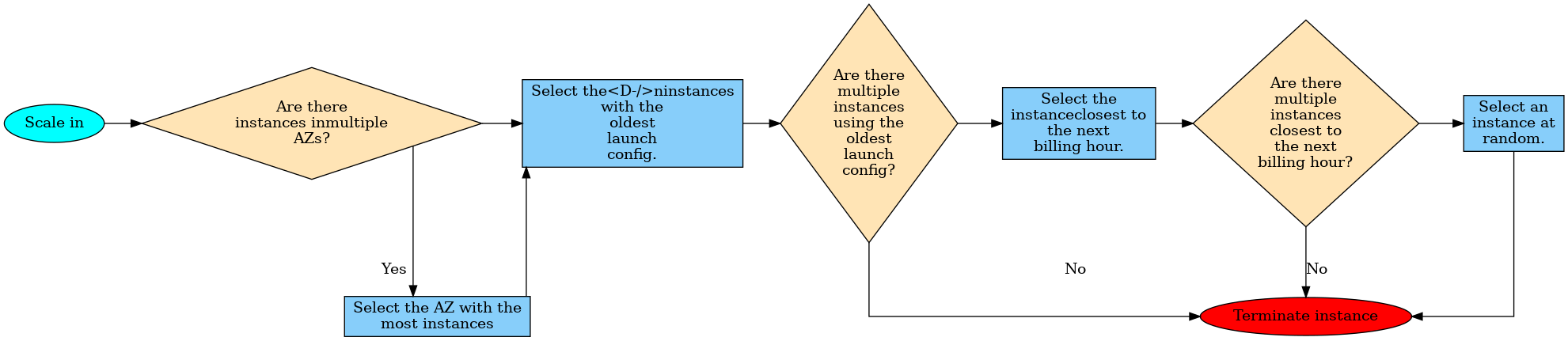
Autoscaling automatically adjusts the number of EC2 instances in response to changing demand.
AWS RDS vs. AWS Aurora
AWS RDS
- Multi AZ, able to run as Master-Master
- read replicas
- Aurora itself only read replicas no Master-Master
High Availability
Network vs Application LoadBalancer
| Parameter | ALB | NLB |
|---|---|---|
| Operates at OSI Layer | Layer 7 (HTTP, HTTPS) | Layer 4 (TCP) |
| Cross-Zone Load Balancing | Always Enabled | Disable by default |
| SSL Offloading | Supported | not Supported |
| Client Request terminates at LB? | Yes | No |
| Headers modified? | Yes | No |
| Host based routing and path based routing | Yes | No |
| Static IP Address for Load Balancer | Not supported | Supported |
Networking
Reserved IP-addresses by VPC
Each VPC reserve the following 5 IP-addresses by default in each Subnet.
For example: in a subnet with CIDR block 10.0.0.0/24, the following five IP addresses are reserved:
- 10.0.0.0: Network address
- 10.0.0.1: Reserved by AWS for the VPC router
- 10.0.0.2: Reserved by AWS: The IP address of the DNS server is always the base of the VPC network range plus two; however, we also reserve the base of each subnet range plus two. For VPCs with multiple CIDR blocks, the IP address of the DNS server is located in the primary CIDR.
- 10.0.0.4: Reserved by AWS for future use
- 10.0.0.255: Network broadcast address. We do not support broadcast in a VPC, therefore we reserve this address.
RT-Recommendation by AWS: For Route tables (RT) do not add an IGW (Internet GateWay) to the default RT. Each VPC will associate a default RT with itself. Use this RT as a private RT, if you need a public RT create a new one, add the subnet-association to it and add the IGW to this RT as a route. As new subnets that are being created will automatically be added to the default RT, and that way one will have more control over the subnets.
AWS VPC-Wizard
The AWS VPC-Wizard has four options for VPC creation and follows above mentioned recommendation.
Options are:
- VPC with a Single Public Subnet
- VPC with Public and Private Subnets (NAT)
- VPC with Public and Private Subnets and AWS Managed VPN Access
- VPC with a Private Subnet Only and AWS Managed VPN Access
NAT Instance vs. NAT Gateway
| NAT Gateway | NAT Instance |
|---|---|
| PROS: Managed by AWS, implicitly highly available and scalable | PROS: Customizable, User in control of creating and managing, Multiple instances needed to be highly available and scalable. |
| Least likely to be a single point of failure | Can become a single point of failure |
| Uniform offering by AWS | Flexibility in the size and type. |
| Cannot be used as a Bastion Server | Can be used as a Bastion Server |
| Port Forwarding is not supported | Port Forwarding is supported |
| Does not support fragmentation for the TCP and ICMP protocols. Fragmented packets for these protocols will get dropped. | Supports reassembly of IP fragmented packets for the UDP, TCP, and ICMP protocols. |
VPC Peering and VPC Endpoints
VPC Peering
- A VPC peering connection is a networking connection between two VPCs that enables you to route traffic between them using private IPv4 or IPv6 addresses.
- Can be created between your own VPCs, with a VPC in another AWS account, or with a VPC in a different AWS Region.
- AWS uses the existing infrastructure of a VPC to create a VPC peering connection; it is neither a gateway nor a VPN connection, and does not rely on a separate piece of physical hardware.
- There is no single point of failure for communication or bandwidth bottleneck.
- Helps facilitating the transfer of data.
- You cannot edit the VPC peering connection once it is created.

Route Table Configuration:
| VPC | Destination | Target |
|---|---|---|
| Requester VPC (172.16.0.0/24) | 10.0.1.0/24 | pcx-xxxxx (peering connection) |
| Acceptor VPC (10.0.1.0/24) | 172.16.0.0/24 | pcx-xxxxx (peering connection) |
Peering Connections are not transitive!
VPC Endpoints
- Virtual devices that enable you to privately connect your VPC to supported AWS services and VPC endpoint services powered by PrivateLink without requiring an internet gateway, NAT device, VPN connection, or AWS Direct Connect connection.
- Instances in your VPC do not require public IP addresses to communicate with resources in the service.
- Traffic between your VPC and the other service does not leave the AWS network.
- Horizontally scaled, redundant, and highly available VPC components.
- Two types:
- Interface Endpoints: An elastic network interface with a private IP address that serves as an entry point. E.g. AWS CloudFormation, AWS CloudWatch etc.
- Gateway Endpoints: A gateway that is a target for a specified route in your route table. E.g. Amazon S3, DynamoDB etc.
VPC Flow Logs
Creation on three levels:
- VPC
- Subnet
- Interface
Route 53
Route 53 is AWS’s DNS service that provides domain registration, DNS routing, and health checking.
Simple Routing Policy
- Traffic is routed to a single resource. E.g. to an ELB or an IP address of a webserver
- not able to create multiple records that have the same name and type,
- multiple values in the same record, such as multiple IP addresses are possible
- Route 53 will return all values in random order to the recursive resolver and the resolver to the client (like a web browser) that submitted the DNS query
- Two types of Records:
- Alias Record: The endpoint will be an AWS resource, such as ELB, CloudFront Distribution etc. You can attach a health check with this record.
- Basic/Non-Alias Record: You specify the IP addresses of individual webservers. You can’t attach a health check to the “basic/non-aliased” simple routing policy.
Weighted Routing Policy
- Let’s you associate multiple resources with a single domain name or subdomain name and choose how much traffic is routed to each resource.
- Create records that have the same name and type for each of your resources
- Assign each record a relative weight that corresponds with how much traffic you want to send to each resource.
- Traffic routed to a resource:
- As percentage:
- Possible Scenario: You want to test a new version of the software and route only some portion of the traffic to the resources having the new version and remaining portion to the old production version.
Geographical Routing Policy
- Traffic is routed based on the geographic location of the origin of DNS query.
- E.g. Traffic coming from an IP address in the USA will be routed to a resource defined in the us-east-1 region, traffic coming from an IP address in Singapore will be routed to the resource in the ap-southeast-1 region.
- If Route 53 cannot identify the location of the DNS query origin, it routes the traffic according to the default record. If there is no default record, Route 53 returns “no answer” response for queries from those locations.
- Possible Scenario: To localize the content and present some or all of the website in the language of the users, to restrict distribution of content to users from specific countries etc.
Latency Routing Policy
- Helps to improve performance by serving their requests from the AWS Region that provides the lowest latency.
- How does this work?
- Create latency records for the resources in multiple AWS Regions.
- When Route 53 receives a DNS query for the domain, it determines which region gives the user the lowest latency, and then selects a latency record for that region.
- Route 53 responds with the value from the selected record, such as the IP address for a web server.
- Possible Scenario: Any application that is deployed in multiple regions and requires response from the resource in milliseconds to microseconds. E.g. Streaming Media or online gaming applications.
Failover Routing Policy
- Lets you route traffic to primary resource when the resource is healthy and to secondary resource when the first resource is unhealthy.
- Possible Scenario: An application hosted on a hybrid cloud. If your instance in cloud fails, the traffic gets routed to an on-prem webserver.
- An important feature of this policy is the Health Check:
- Monitors the health and performance of your web applications, webservers, and other resources.
- It monitors:
- The health of a specified resource, such as a webserver
- The status of other health checks
- The status of an Amazon CloudWatch alarm.
- After you create a health check, you can get the status of the health check and configure DNS failover.
- You can configure an Amazon CloudWatch alarm for each health check.
Multivalue Answer Routing Policy
- Lets you configure Amazon Route 53 to return multiple values (e.g. IP Addresses) in response to DNS queries.
- Different than Simple Routing Policy: Lets you check the health of each resource, so Route 53 returns only values for healthy resources.
- It’s not a substitute for a load balancer.
- Route 53 responds to DNS queries with up to eight healthy records and gives different answers to different DNS resolvers.
- Note:
- If you associate a health check, Route 53 responds to DNS queries with the corresponding IP address only when the health check is healthy.
- If you don’t associate a health check, Route 53 always considers the record to be healthy.
- If you have eight or fewer healthy records, Route 53 responds to all DNS queries with all the healthy records.
- When all records are unhealthy, Route 53 responds to DNS queries with up to eight unhealthy records.
- Possible Scenario: Virtually any web application that is hosted on multiple servers.
Geoproximity Routing Policy
- Traffic is routed to resources based on the geographic location of your users and resources.
- You can choose to route more or less traffic to a given resource by specifying a value, known as a bias. A bias expands or shrinks the size of the geographic region from which traffic is routed to a resource.
- To use geoproximity routing, you must use Route 53 traffic flow. You create geoproximity rules for your resources and specify one of the following values for each rule:
- If you’re using AWS resources, the AWS Region that you created the resource in.
- If you’re using non-AWS resources, the latitude and longitude of the resource.
- Optionally change the size of the geographic region from which Route 53 routes traffic to a resource, specify the applicable value for the bias:
- To expand the size of the geographic region from which Route 53 routes traffic to a resource, specify a positive bias/integer from 1 to 99. Route 53 shrinks the size of adjacent regions.
- To shrink the size of the geographic region from which Route 53 routes traffic to a resource, specify a negative bias/integer from -1 to -99. Route 53 shrinks the size of adjacent regions.
Monitoring and Reporting
Overview Monitoring and Reporting
Why is Monitoring required?
- Monitoring compute layer (EC2, EBS, ELB) for usage and outages.
- Monitoring AWS S3 for storage and request metrics.
- Monitoring Billing and create alarms for excess usage.
What is CloudWatch and how does it work?
- Amazon CloudWatch is a monitoring and management service.
- CloudWatch provides you with data and actionable insights to monitor your applications, understand and respond to system-wide performance changes, optimize resource utilization, and get a unified view of operational health.
- What it does:
- Collect: Logs, Metrics, Events
- Monitor: Dashboards, Alarms
- Act: on Alarms, on Events
- Analyze: Search and understand problems and metrics
CloudWatch EC2 custom metrics and monitoring
Minimal requirements in the role policy for logging to CloudWatch:
- cloudwatch:PutMetricData
- cloudwatch:GetMetricStatistics
- cloudwatch:ListMetrics
- ec2:DescribeTags
# Install packages
$ sudo yum install -y perl-Switch perl-DateTime perl-Sys-Syslog perl-LWP-Protocol-https perl-Digest-SHA.x86_64

# Download monitoring scripts
$ curl https://aws-cloudwatch.s3.amazonaws.com/downloads/CloudWatchMonitoringScripts-1.2.2.zip -O

# Install monitoring scripts
$ unzip CloudWatchMonitoringScripts-1.2.2.zip && \
$ rm CloudWatchMonitoringScripts-1.2.2.zip && \
$ cd aws-scripts-mon

# Perform a simple test without pushing to CloudWatch
$ ./mon-put-instance-data.pl --mem-util --verify --verbose

# Push to CloudWatch manually
$ ./mon-put-instance-data.pl --mem-used-incl-cache-buff --mem-util --mem-used --mem-avail

# Scheduling metrics report to CloudWatch
$ crontab -e
*/1 * * * * ~/aws-scripts-mon/mon-put-instance-data.pl --mem-used-incl-cache-buff --mem-util --mem-used --mem-avail --disk-space-util --disk-path=/ --from-cron

# To Get utilization statistics on the instance terminal
$ ./mon-get-instance-stats.pl --recent-hours=12
EBS Monitoring
- Data is only reported to CloudWatch when the volume is attached to an instance.
- CloudWatch collects metrics.
- CloudWatch performs Status Checks.
- Customers can set alarms to get notified on the usage of EBS volumes.
ELB Monitoring
ELB types:
- Application Load Balancer (ALB, Layer 7)
- Network Load Balancer (NLB, Layer 4, TCP/IP and TLS)
- Classic Load Balancer (both Layer 4 and 7, but deprecating)
Types of monitoring ELB:
- CloudWatch metrics
- Access logs
- Request tracing
- CloudTrail logs
AWS Trusted Advisor
AWS Trusted Advisor helps you provision your resources by following best practices. It inspects your AWS environment and finds opportunities to save money, improves performance and reliability, or helps you to close security gaps.
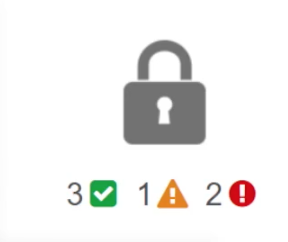
Trusted Advisor covers the following five fields:
Cost Optimization:
- Under utilized EC2 instances
- Idle Elastic Load Balancers
- Unassociated Elastic IPs
Performance:
- Highly utilized EC2 instances
- Rules in EC2 security groups
- Over utilized EBS Volumes
Security:
- Security Groups unrestricted access.
- IAM Password Policy
Fault Tolerance:
- EC2 instance distribution across AZs in a region
- AWS RDS Multi AZ
Service Limits:
- Service limits on AWS VPC, EBS, IAM, S3 etc.
AWS Resource Groups
- A resource group is a collection of AWS resources that are all in the same AWS region, that match criteria provided in a query, and that share one or more tags or portions of tags.
- Tagging:
- A tag is a label that you assign to an AWS resource and is useful when you have many resources of the same type.
- A tag is a Key-Value-Pair.
- Useful for Patching, Run commands, Monitoring in Bulk on Resource Groups.
AWS CloudTrail
- AWS CloudTrail is an AWS Service that helps you enable governance, compliance, and operational and risk auditing of your AWS account. Actions taken by a user, role, or an AWS service are recorded as events in CloudTrail.
- You can view and search the last 90 days of events recorded by CloudTrail in the CloudTrail console or by using the AWS CLI.
- You can download a CSV or JSON file containing up to the past 90 days of CloudTrail events for your AWS account.
- You can create a Trail to deliver log files to your Amazon S3 bucket.
- Process the CloudTrail event logs from S3 bucket using services such as Kinesis for further analysis.
CloudWatch vs CloudTrail
| AWS CloudWatch | AWS CloudTrail |
|---|---|
| Tracks performance of AWS resources by collecting metrics in the form of events or logs. | Tracks user activity on API calls made through AWS Management Console, AWS CLI, AWS SDKs and APIs to AWS resources on your account. |
| Reports metrics from 1-minute periods to 5-minute periods. | Typically delivers log files within 15 minutes of account activity |
| Helps to gain system-wide visibility into resource utilization, application performance, and operational health. | Helps to gain visibility into your user and resource activity by recording AWS API calls. |
| To be used for monitoring the health of your application built on AWS resources. | To be used for monitoring actions performed on the AWS resources by users on your AWS account. |
S3 server logs troubleshooting
Provides access log record with the following information about single access requests:
- Name of the bucket which was accessed (source bucket)
- Requester
- Request time
- Request action
- Request status and
- Error code (if any was issued)
Automation
CloudFormation
What is CloudFormation?
- Provisions, configures and manages the stack of AWS resources (infrastructure) based on the user-given template.
- Infrastructure-As-A-Code (IaaC) service.
Why to use it?
- Simplifies infrastructure management.
- Provides ability to view the design of the resources before provisioning.
- Quickly replicates the infrastructure.
- Controls and tracks infrastructure changes (versioning).
- Handles the dependency between the resources in the template.
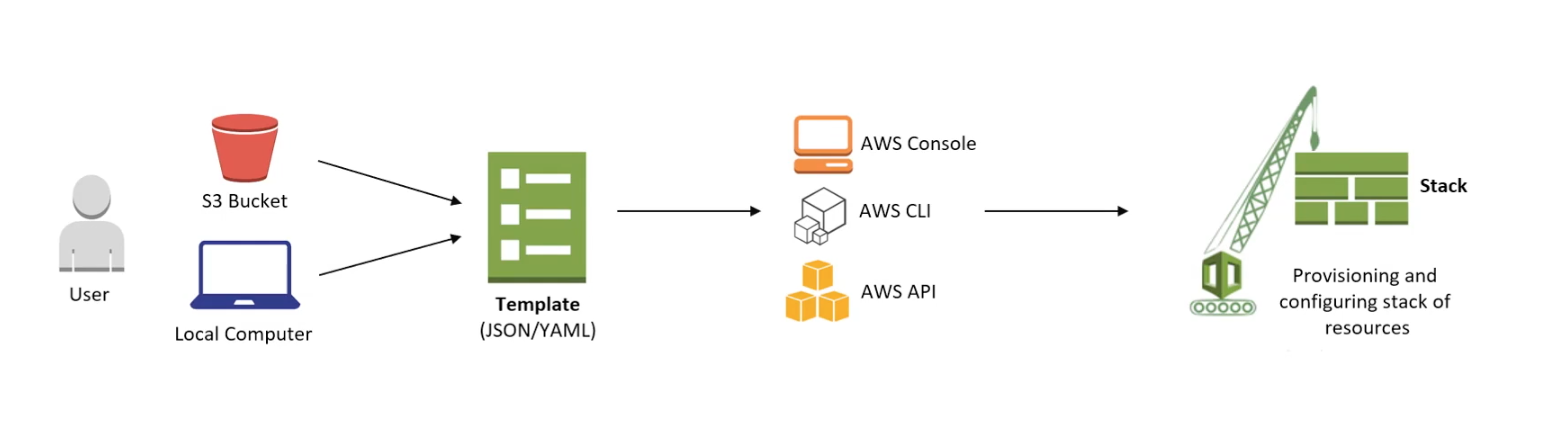
What is a Stack?
- Collection of AWS resources that are created according to the template.
- CloudFormation manages resources by creating, updating or deleting the stacks.
- Can be simple as one resource to an entire web application.
- Must all be created or deleted successfully for the stack to be created or deleted.
- If a resource cannot be created, CloudFormation rolls the stack back and automatically deletes any resources that were created.
- If a resource cannot be deleted, any remaining resources are retained until the stack can be successfully deleted.
Elastic BeanStalk
What is Elastic BeanStalk?
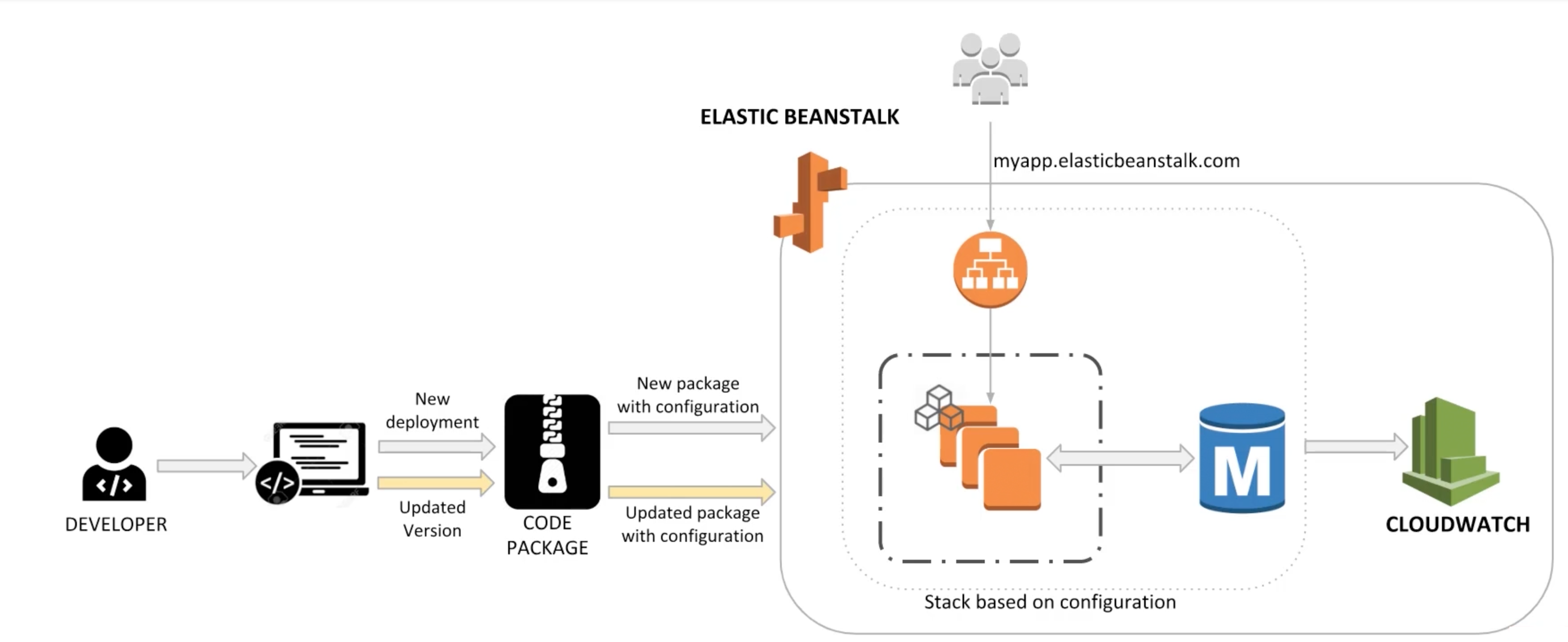
- You can quickly deploy and manage applications in the AWS Cloud without worrying about the infrastructure that runs those applications.
- Upload your application, and Elastic BeanStalk automatically handles the details of capacity provisioning, load balancing, scaling, and application health monitoring.
- Elastic BeanStalk supports applications developed in GO, Java, .NET, Node.JS, PHP, Python, and Ruby, as well as different platform configurations for each language on familiar servers such as Apache, Nginx, Passenger, and IIS.
- You can define configuration for infrastructure and software stack to be used for a given environment.
- You can also perform most deployment tasks, such as changing the size of your fleet of Amazon EC2 instances or monitoring your application, directly from the Elastic BeanStalk web interface.
Lambda
What is AWS Lambda?
- A compute service that lets you run code without provisioning or managing servers. Sometimes also called serverless computing.
- Executes your code only when needed and scales automatically, from a few requests per day to thousands per second.
- Runs your code on a high-availability compute infrastructure and performs all of the administration of the compute resources, including server and operating system maintenance, capacity provisioning and automatic scaling, code monitoring and logging.
- You can write code in following languages: Java, Python, C#, GO, and Node.JS
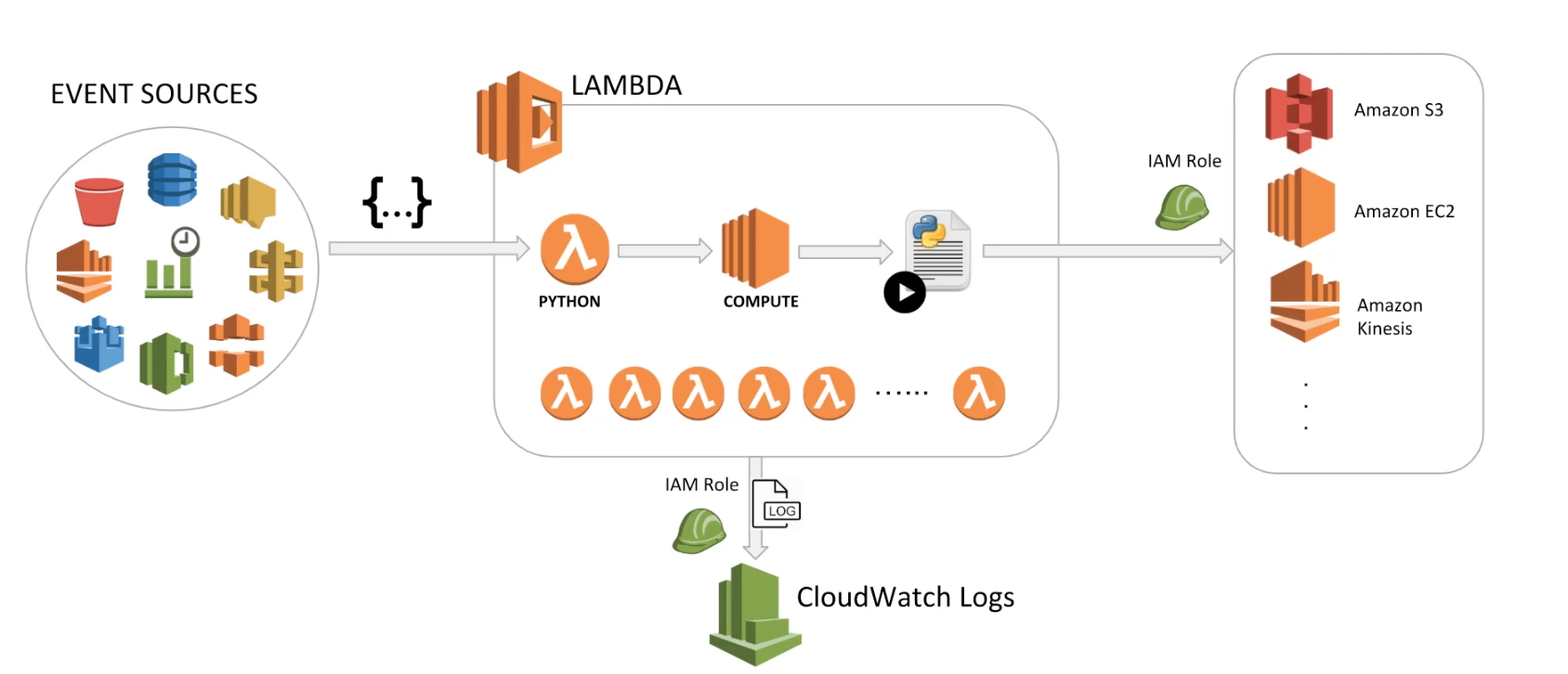

Limitations:
- Maximum Memory: 3 GB.
- Maximum execution time: 900 seconds or 15 minutes.
IAM Role policy to grant access on S3 source for Lambda:
{
  "Version": "2012-10-17",
  "Statement": [
    {
      "Sid": "ListSourceAndDestinationBuckets",
      "Effect": "Allow",
      "Action": [
        "s3:ListBucket",
        "s3:ListBucketVersions"
      ],
      "Resource": [
        "arn:aws:s3:::whiz-demo-lambda-source-bucket",
        "arn:aws:s3:::whiz-demo-lambda-destination-bucket"
      ]
    },
    {
      "Sid": "SourceBucketGetObjectAccess",
      "Effect": "Allow",
      "Action": [
        "s3:GetObject",
        "s3:GetObjectVersion"
      ],
      "Resource": "arn:aws:s3:::whiz-demo-lambda-source-bucket/*"
    },
    {
      "Sid": "DestinationBucketPutObjectAccess",
      "Effect": "Allow",
      "Action": [
        "s3:PutObject"
      ],
      "Resource": "arn:aws:s3:::whiz-demo-lambda-destination-bucket/*"
    },
    {
      "Effect": "Allow",
      "Action": [
        "logs:CreateLogGroup",
        "logs:CreateLogStream",
        "logs:PutLogEvents"
      ],
      "Resource": "*"
    }
  ]
}
Example Python Code for Lambda:
import json
import boto3
import os
from urllib.parse import unquote_plus

def lambda_handler(event, context):
    # TODO implement

    s3 = boto3.client('s3')

    for record in event['Records']:
        srcKey = unquote_plus(record['s3']['object']['key'])
        srcBucket = record['s3']['bucket']['name']
        print(record)
        print(srcKey)
        destBucket = os.environ['DESTINATION_BUCKET']
        print(destBucket)
        if (srcKey.endswith('/') and record['s3']['object']['size'] == 0):
            print('Object is not a file. Skipping execution...')
        else:
            try:
                print("Starting to copy...")
                copySource = {'Bucket': srcBucket, 'Key': srcKey}

                response = s3.copy_object(CopySource=copySource, Bucket=destBucket, Key=srcKey)

                print("Object {} successfully copied to destination bucket {}".format(srcKey, destBucket))
            except Exception as e:
                print("ERROR: ", e)
OpsWorks
What is OpsWorks?
- AWS OpsWorks is a configuration management service that helps you configure and operate applications in a cloud enterprise by using Puppet or Chef.
- Help development and operations teams manage applications and infrastructure.
- AWS OpsWorks for Puppet Enterprise: Lets you create AWS-managed Puppet master servers.
- AWS OpsWorks for Chef Automate: Lets you create AWS-managed Chef servers that include Chef Automate premium features.
- AWS OpsWorks Stacks: Provides a simple and flexible way to create and manage stacks and lets you deploy and monitor applications in your stacks.
Application Integration
SQS, SNS and SWF
SQS (Simple Queue Service):
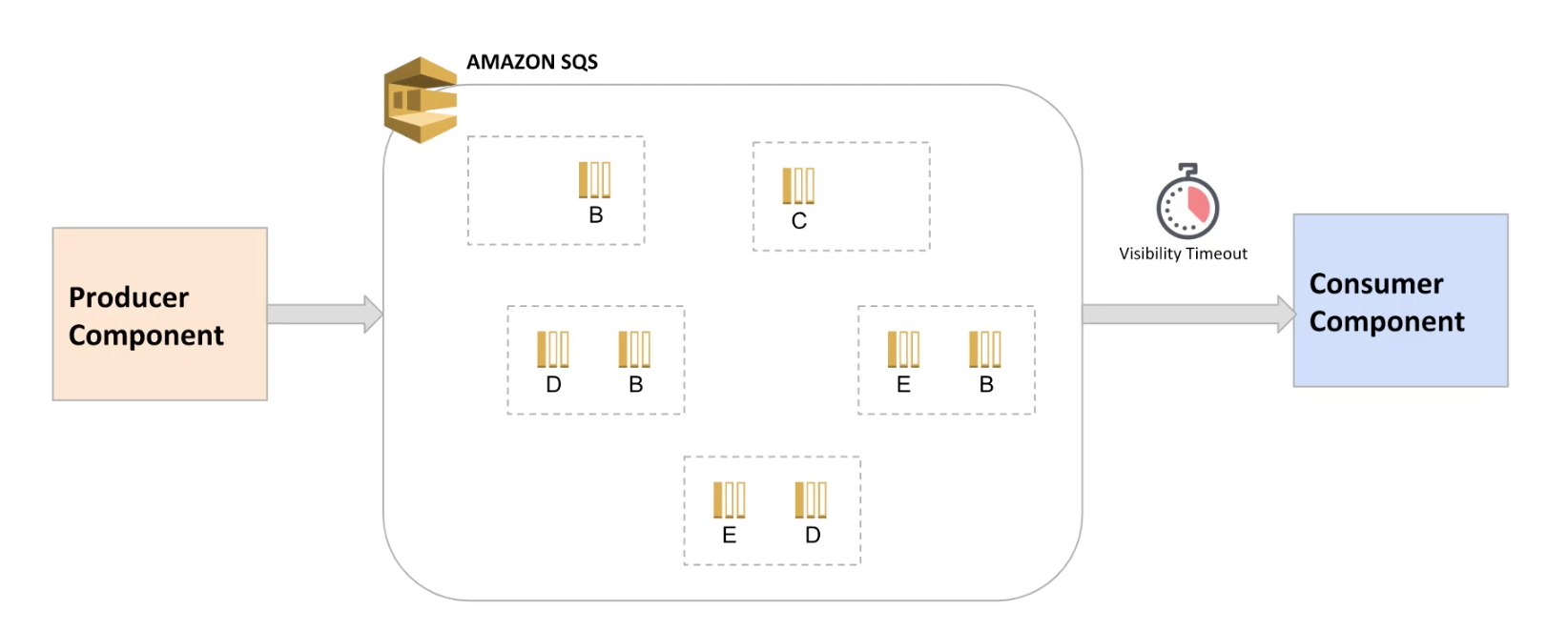
- Hosted queue that lets you integrate and decouple distributed software systems and components.
- Producer component sends message to the queue and consumer component reads/polls message from the queue.
- You can add message attributes to send structured metadata.
- Consumer components can poll messages using short polling or long polling.
- You can set visibility timeout, a period of time during which Amazon SQS prevents other consumers from receiving and processing the message (Min: 0 sec, Max: 12 hours, Default: 30 secs).
- You can use Dead-letter queues, which other queues (source queues) can target for messages that can’t be processed (consumed) successfully.
- Two types of queues: Standard Queue and FIFO Queue
SNS (Simple Notification Service):
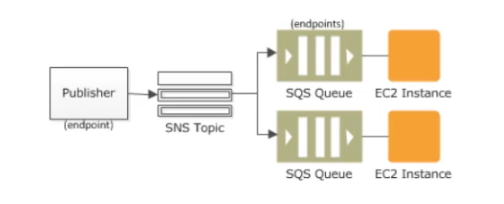
- Coordinates and manages the delivery or sending of messages to subscribing endpoints or clients.
- Publishers (producers) communicate asynchronously with subscribers by producing and sending a message to a topic, which is a logical access point and communication channel.
- Subscribers (consumers) consume or receive the message or notification over one of the supported protocols when they are subscribed to the topic.
- Following are SNS subscriber endpoints: HTTP, HTTPS, eMail, eMail-JSON, SMS, SQS, Lambda, Applications

SWF (Simple Workflow Service):
- SWF makes it easy to build applications that coordinate work across distributed components.
- Task: A task represents a logical unit of work that is performed by a component of your application.
- Worker: Workers are used to perform tasks. These workers can run either on Amazon EC2, or on your own on-premises.
- Actor: Starter (any application that can initiate workflow executions), Deciders (an implementation of a workflow’s coordination logic), Activity Workers (a process or thread that performs the activity tasks that are part of your workflow)
Summary
SQS (Simple Queue Service):
- SQS decouples distributed software systems and components.
- SQS stores messages redundantly on SQS servers.
- To receive SQS messages, Long polling is preferred to short polling.
- Types of queues:
- Standard Queue: Best-effort ordering, at-least-once delivery
- FIFO Queue: First-In-First-Out delivery, exactly-once processing
SNS (Simple Notification Service):
- SNS is a publisher/subscriber (Pub/Sub) service.
- SNS publisher will push the message to a topic.
- SNS subscriber will subscribe to a topic and will receive message when pushed by publisher.
- SNS scenarios are: Fanout, Application and System Alerts, Push eMail and Text Messaging, and Mobile Push Notifications.
SWF (Simple Workflow Service):
- SWF makes it easy to build applications that coordinate work across distributed components.
- SWF Components are:
- Tasks: Logical units of work
- Workers: Processes that perform tasks
- Actors: Starters (initiate workflows), Deciders (coordination logic), Activity Workers (perform activity tasks)